Mastering the Williams-Toyota FW31 iRacing cockpit is the most difficult challenge for any open-wheel enthusiast. Unlike a standard race car, the FW31 requires constant input from the driver to maintain peak performance. You aren’t just steering and shifting; you are managing a high-performance computer at 190 MPH. This driving school article focuses on the Multi-Function Display (MFD) and the steering wheel settings that separate the champions from the mid-pack finishers.
Understanding the Williams-Toyota FW31 iRacing Steering Wheel
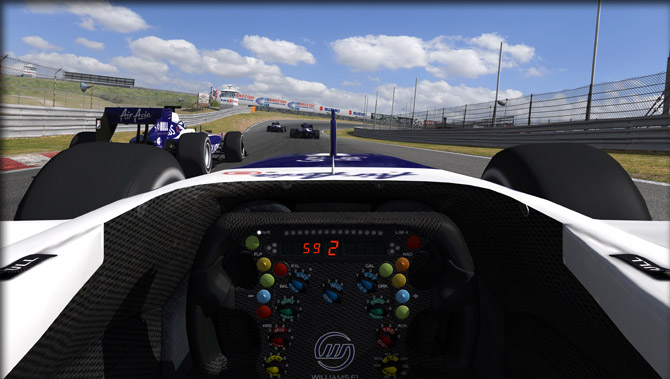
The steering wheel in the Williams-Toyota FW31 iRacing model is your primary interface for car performance. It features a digital display and dozens of rotary switches. In the sim, you can map these functions to your own hardware to make adjustments during the race. The most important data points on the screen are your gear indicator, shift lights, and the delta timer. You must learn to read this information without taking your eyes off the racing line for more than a fraction of a second.
One of the most powerful tools available is the “Entry” and “Exit” differential settings. These rotaries change how the rear wheels lock together during different phases of the corner. An open differential on entry helps the car rotate into the apex. A locked differential on exit provides maximum traction as you apply the 700-plus horsepower. Mastering these Williams-Toyota FW31 iRacing settings allows you to tune the car’s handling as your fuel load drops and your tires wear out.
Managing Engine Braking and Fuel Maps
The Williams-Toyota FW31 iRacing release features complex engine braking maps. Engine braking refers to how much the engine slows the car down when you lift off the throttle. High levels of engine braking can help rotate the car in tight hairpins but can also cause the rear wheels to lock up. You must find a map that complements your braking style. If you find the car spinning during turn-in, try lowering your engine braking setting to stabilize the rear axle.
Fuel management is another critical skill taught in this Williams-Toyota FW31 iRacing school. You can change your fuel mixture on the fly to save gas or gain power. Running “Lean” mixtures will save fuel during a yellow flag or a long stint, while “Rich” mixtures provide maximum acceleration for overtaking. Be careful, though; running a rich mixture for too long will overheat the 2.4L V8 engine. Always monitor your water and oil temperatures on the MFD to avoid a mechanical failure.
Advanced Braking: Bias and Migration
Stopping a Williams-Toyota FW31 iRacing machine requires more than just pushing the pedal. The car features massive carbon-fiber brakes that only work effectively when they are hot. You can adjust your Brake Bias (the balance between front and rear braking force) from the cockpit. Moving the bias forward prevents the rear from stepping out but increases the risk of locking a front tire. Moving it rearward helps the car turn under braking but makes the chassis much more nervous.
As you burn fuel, the weight distribution of the car changes. You will likely need to move your brake bias forward as the race progresses. Professional sim racers check their MFD every few laps to ensure their bias matches the current handling of the car. This level of constant adjustment is what defines the “pro” experience in the Williams-Toyota FW31 iRacing series. If you stay static, you will eventually lose pace to those who are active with their settings.
Practicing Your MFD Workflow
The secret to success in the Williams-Toyota FW31 iRacing is muscle memory. You should practice making adjustments on a long straightaway where you have time to look down. Assign your most-used functions—like brake bias and differential—to easily reachable buttons on your wheel. Never try to make a complex MFD change in the middle of a high-speed corner. With enough practice, these adjustments will become second nature, allowing you to focus entirely on the ultimate lap time.