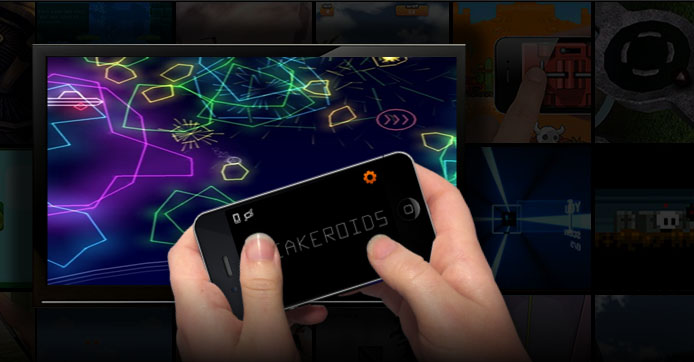
iRacing is now utilizing the Brass Monkey engine http://playbrassmonkey.com/ to provide integration between your tablet/smart phone and iRacing. By downloading the brass monkey client from your app store you can now use your tablet or phone as a digital dash or even as a driving controller. Simply launch the Brass Monkey client on your phone, and click the iRacing link once the simulator is up and running. Tapping the steering wheel or HUD icon in the upper left will allow you to switch between displays. The app.ini key [Brass Monkey] BMAllowDrive=1 allows you to shut off the driving controls permanently.
[ads1]
1) Install brass monkey client on your phone/tablet
2) Launch brass monkey client on your phone/tablet
3) Start the iRacing simulator (not the website)
4) Click the iRacing link on the brass monkey client to connect
5) Click the steering wheel or HUD icon in the upper right hand side to switch between a heads up display and driving controls
6) If you can’t make this work, double check that your phone is on the same wifi network as your computer.
ALSO SEE
eNASCAR College iRacing Series Expands to 8 Tournaments in 2026-27
iRacing has announced the 2026-27 eNASCAR College iRacing Series schedule, expanding from 6 to 8 tournaments and tightening the Time Attack qualifying window from 10 days to 6.
Does Car Choice Really Matter in iRacing GT3?
When it comes to GT3 racing in iRacing, the conversation often circles back to meta cars — whichever manufacturer is considered fastest at a given track or season. But many drivers stick with one GT3 they love, regardless of balance of performance shifts. That raises an important question: does car choice actually limit how high…
Why Monza Can Be Chaos in iRacing
Monza is one of the most iconic circuits in motorsport history. It’s fast, it’s legendary, and it’s a fan favorite in Formula 1 and GT racing. But in iRacing, Monza has earned a different reputation: a track where chaos seems inevitable. From the first lap carnage to the way incident points pile up, Monza can…
How to Get the Most Out of iRacing’s AI (A Practical, Tunable Playbook)
iRacing’s AI can be incredible once tuned right. This guide shows how to build a custom roster, balance aggression, optimism, and smoothness, and create realistic, story-driven races that feel like competing in a real championship.
iRacing AI Can Now Finish Events Without You
A new AI feature in iRacing Season 2 automatically simulates and scores the rest of a solo AI race if you leave before it finishes.
iRacing Week 13 Returns: Full 2026 Season 1 Schedule
The full iRacing 2026 Season 1 Week 13 schedule is out, with more Ranked series than any previous edition and a rain-soaked Nordschleife run in the mix.