iRacing has had third-party track map overlays for years, but they have always come with trade-offs: setup friction, overlay software overhead, and a dependence on the max-received-cars setting cranked to maximum. Season 3 fixes this with a native iRacing track map widget built directly into the sim engine. Because it runs natively, it does not create the CPU load that external overlays or high received-car counts can generate, and it requires no third-party software to configure.
➡️ iRacing Season 3 2026: Full Build Breakdown
The Four iRacing Track Map Modes
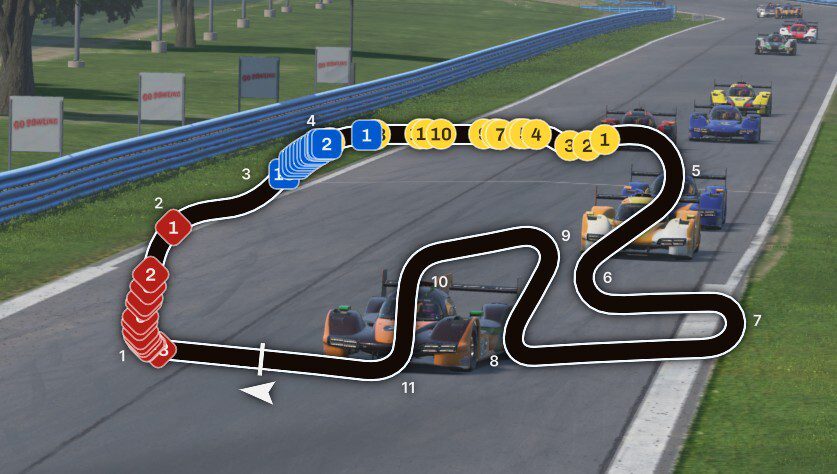
Four distinct map modes ship with Season 3. Track Map is the traditional top-down view of the full circuit layout, with all cars displayed as they move around the track. Turn numbers are visible alongside the layout. Mini Map zooms in on your car and rotates to match your direction of travel, which makes large circuits easier to read at a glance and is useful for drivers who prefer a more local view of what is immediately around them.
Flat Map shows all cars on a single horizontal line, ordered by position. It takes up minimal screen space and is ideal for placing above or below your virtual mirror without cluttering the view. Radial Map is the most strategically oriented of the four modes. Directly inspired by real pit wall tooling, it abstracts away the track shape entirely and instead shows gaps between cars on a time-normalized circular display. Because position on the ring represents time gap rather than physical distance, a dot only moves closer on the radial map if a car is actively gaining time on you. This makes it genuinely useful for spotting undercuts during pit cycles.
The radial display breaks down into three rings. The outer ring shows cars on the lead lap. The second ring shows cars lapped once by the class leader, and the third ring shows cars lapped twice or more. Cars in pit lane are removed from the rings and shown on a horizontal line in the center. Pit lane positioning remains distance-based rather than time-normalized.
Performance and Multi-Class Support
The performance angle is worth understanding. iRacing’s engineering team built an entirely new network packet type specifically for this feature. This packet compresses and transmits position data for every car in the session in a lightweight, optimized format. As a result, the iRacing track map does not depend on the received-cars setting in your configuration, and it does not share resources with the full physics data stream. You can run it in a 40-car GT3 field without it affecting your frame rate the way that third-party overlay solutions can.
Multi-class races are handled through color coding. Each class gets its own dot color and shape, so you can distinguish GTP from GT3 from GT4 at a glance. The focus car is larger, outlined in white, and drawn below other dots to keep it visible in traffic. Cars that have lapped you get a red dotted outline; cars you have lapped get a light blue dotted outline. The pace car appears as a gray circle labeled PC.
Configuration and Customization
The entire widget is opt-in. It is off by default and enabled through the Widget Editor via Alt+K in the sim. Label options let you display car number, class standing, or driver name on each dot. The Player Relative setting, available in Flat and Radial modes, locks the focus car to a fixed position for consistent visual reference. Widget Scale adjusts the size of elements within the map. The bottom-left corner is draggable to resize the widget’s screen footprint.
Third-party tools like SimHub and MoTeC have offered track map overlays for years, and they work well. However they require setup, add system overhead, and fall outside the sim itself. Having this capability built in, with its own optimized data pipeline and native multi-class support, is a meaningful quality-of-life win for anyone who races in fields larger than about 10 cars. For endurance racing, multi-class events, and any situation where pit strategy depends on knowing where the traffic is, the Radial Map in particular gives you a level of situational awareness that was previously only available through third-party tools or a spotter with a separate screen.
Track Map Modes in Action