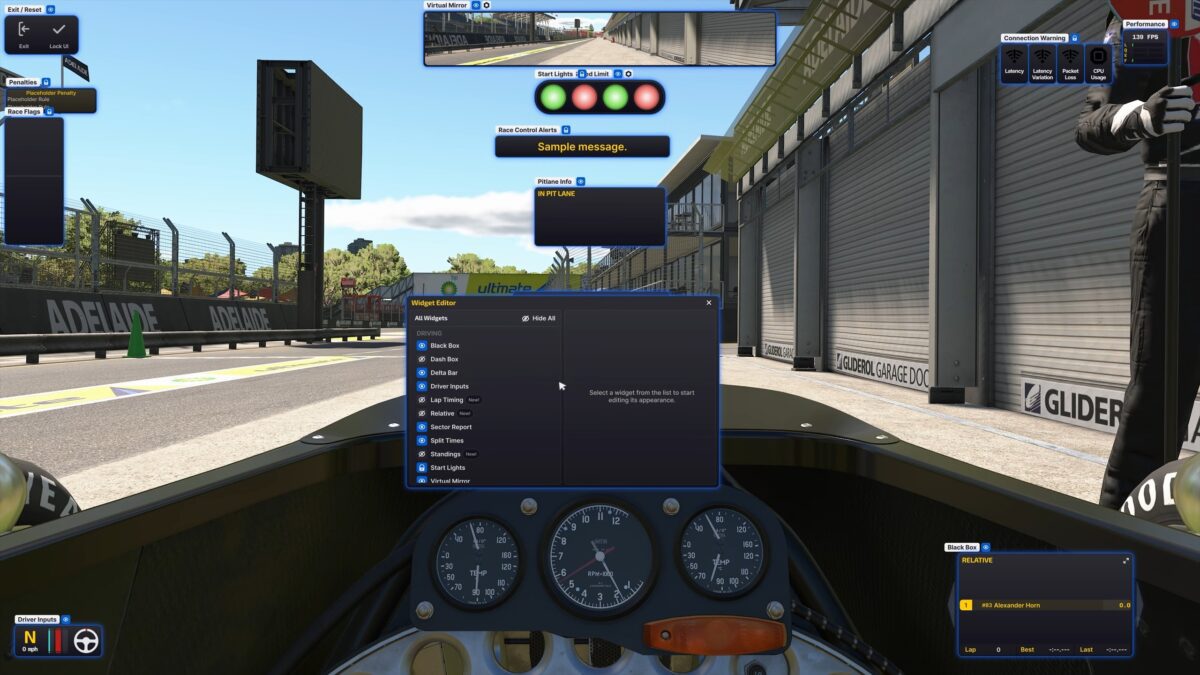
iRacing recently modernized the in-race experience with a powerful new framework. This updated iRacing Sim UI Guide covers exactly how to use these professional-grade tools. Specifically, the December 9th build introduced the revolutionary Widget Editor. Now, racers can finally tailor their on-screen information to fit their exact cockpit needs.

Accessing the Customization Tools
You can customize your interface directly while you are on the track. First, press Alt-K to toggle the editing mode. Once this mode is active, you can drag every element to a new position on your monitor.
- Resize Elements: Use the widget borders to scale your boxes for better visibility.
- Adjust Opacity: Make HUD elements transparent so you can see more of the racing surface.
- Anchor Widgets: Lock your favorite boxes in specific corners to maintain a clean look.
If you cannot see your widgets after pressing Alt-K, click the “Make All Visible” button. This toggle temporarily shows every element so you can find hidden boxes.
Working with Standalone Dash Widgets
Previously, you could only view one info box at a time. However, the latest update changes this restriction completely. You can now open up to five different panels at once.
- Independent Boxes: The Relative, Standings, Weather, and Lap Timing boxes are now standalone.
- Detailed Data: See your iRating and Safety Rating directly in the Standings widget.
- Constant Monitoring: Keep your fuel info open while you still watch the Relative gap to your rivals.

Finding Settings with the New Search
The update also simplifies the deep settings menu. A new Options Search bar is now available within the interface. Simply type the name of a setting to find it instantly.
For example, you can search for “Brake Bias” to make quick adjustments during a session. Furthermore, descriptions for volume sliders have been updated to improve these search results. This feature saves valuable time during high-pressure practice sessions.
Visual HUD Improvements and Fixes
The interface now supports high-resolution artwork for all overlays. Additionally, iRacing has fixed several early issues with the new UI.
- VR Improvements: The team fixed a critical issue where the interface appeared blurry for VR users.
- UI Scaling: Horizontal scrolling no longer occurs when your UI scale is greater than 100%.
- Opacity Fix: Widgets now respond correctly to opacity changes in all sessions.